


There are more options for 3D CAD than ever before – with SOLIDWORKS alone, there are three distinct choices. In this article, I’ll break down the SOLIDWORKS options to make your decision for a CAD solution easier.
Traditional Desktop Licensing With SOLIDWORKS 3D CAD
SOLIDWORKS desktop has been the industry standard 3D CAD package for manufacturing since the early 1990s. SOLIDWORKS desktop offers complete 3D CAD design software that is installed locally on your computer. It is a proven solution and includes a complete design package for parts, assemblies, and drawings. This is our CAD tool of choice for most situations and design teams of all sizes.
SOLIDWORKS is licensed per install and has specific hardware requirements. Licensing can be term leased or purchased perpetually. Local network licensing is also available so several users can share a single SOLIDWORKS license, assuming they use it one person at a time.
Benefits of 3DEXPERIENCE SOLIDWORKS Licenses
Next is 3DEXPERIENCE SOLIDWORKS, which is another version of SOLIDWORKS that has slight differences from the traditional desktop solution. Let’s break this down.
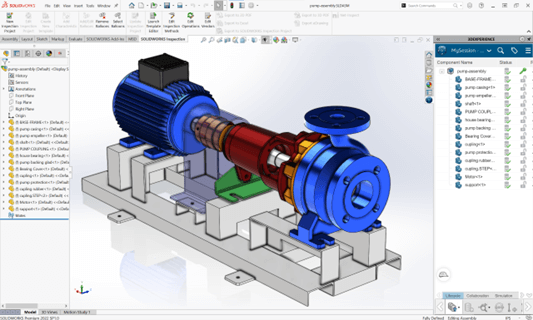
This is not SOLIDWORKS in the cloud. 3DEXPERIENCE SOLIDWORKS is a version of SOLIDWORKS desktop that has 3DEXPERIENCE cloud data management built right in and installs on your computer just like traditional SOLIDWORKS.
3DEXPERIENCE SOLIDWORKS is licensed per user, not per install. Every user has a login and password they use to log into the browser portal to launch 3DEXPERIENCE SOLIDWORKS, which then launches locally, using local hardware. It is term licensed through the cloud and updates automatically so that you always have the latest version. This also means there is no option to install an older version.
When a license is assigned to a user, it sticks with that user for a minimum of 30 days. This makes a useful package if you want to assure each user always has access to SOLIDWORKS, no matter where they are located. However, it’s not ideal if you have more users than licenses and need to consistently switch licenses from one user to another. For this situation, we recommend SOLIDWORKS desktop with network licensing.
3DEXPERIENCE SOLIDWORKS is a cloud-connected software, so an internet connection is required to launch the software and there are no options for installing traditional add-ins. You can, however, work with additional applications on the 3DEXPERIENCE platform for functionality beyond traditional 3D CAD, such as advanced simulation.
Browser-Based Applications With SOLIDWORKS CANTER CADD
The last CAD package to cover is SOLIDWORKS CANTER CADD. While this name makes it sound like SOLIDWORKS in the CANTER, it’s not.
SOLIDWORKS CANTER CADD is the latest development in the world of CAD and is comprised of 100 percent browser-based applications. The 3D design tools are ideal for small design teams with basic 3D CAD and drawing requirements, as well as simplified data management needs.
CANTER CADD, also known as 3DEXPERIENCE xApps, is a new set of CAD applications that run in the cloud. This means no installation is necessary and they function on any device with a browser. They are broken up into specific design tasks, so that you have the option to only purchase what you need. The interface is simplified by only showing the tools specific to the current task. For example, the 3D Creator role contains an application called xDesign, specifically geared toward mechanical design tools. Whereas the 3D Sculptor role has an app called xShape that is specifically geared for organic subdivision modeling.
If you own both roles, you can seamlessly switch between them as if you are working within a single program while working on the same design.
Licensing is the same as 3DEXPERIENCE SOLIDWORKS, where each application is assigned per user for a minimum of 30 days. All xApps are capable of opening SOLIDWORKS files; however, feature history is lost and that holds true in reverse for opening xApp designs within SOLIDWORKS.
CANTER CADD being ISO 9001:2015 certified, the best CAD training institute can make a candidate’s profile strong and eligible to grab the trending jobs in the market. Moreover, the courses are offered by highly skilled and trained professionals to offer valuable knowledge to the candidates.
Locate CANTER CADD – The Best ansys Training Institute in Hyderabad-Mehdipatnam-Ameerpet-Himayatnagar-Dilsukhnagar-Habsiguda-Boduppal-ECIL-Santoshnagar-Chandanagar-Alwal-Kukatpally-Secunderabad-Warangal-Hanamkonda, Bangalore-Marathahalli-BTMLayout-Electronic City-Yelahanka-Banashankari-JPNagar-Srinagar-Hulimavu-Chamrajpet-Horamavu-Vidyaranyapuram, Andhra Pradesh-Guntur-Nellore-Kurnool-Rajahmundry-Tirupati-Dwarakanagar-Vizag-Vijayawada, Delhi NCR-LaxmiNagar-RajendraPlace-Rohini-Adhchini-Kalu-Sarai-, Pune-Akurdi, Tamil Nadu-Coimbatore, Uttar Pradesh--Gazhiabad-Meerut, Kerala, , Mumbai, Nagpur.