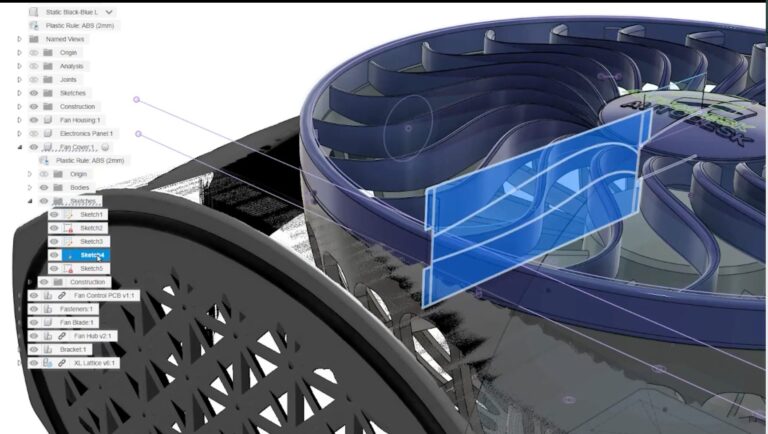
Get started with the new updates now available for configurations in Autodesk Fusion. Learn how to make configurable designs effortless with on-the-fly adjustments, enhanced feature control, and unified documentation for multiple variations. Boost productivity with parametric lattices, improved suppression handling, and streamlined workflows for drawings and renderings.
In the latest release, we’re taking configurations to the next level with several exciting enhancements. From improved feature control handling to mesh body configurations and streamlined workflows for renderings and drawings, check out what’s new:
Configurations on the fly: More intuitive control
Managing product variations just got a lot easier. With the new Configure on the Fly feature, you can now add configurable elements—like dimensions, suppressions, or features—directly while modeling, without needing to backtrack.
How it works
Add configurable parameters, such as a fillet radius or an extrude offset, directly into the configurations table as you design. You can also make real-time adjustments to configurations and see instant updates.
For example, if you’re working on a desktop fan design, you can seamlessly toggle between configurations for different fan blade types or color variations—all managed right from the design interface.
While most solid and surface modeling tools including sketches, extrudes, solid surfaces and modeling process are supported, we expect future updates to include tools like shell, pattern, and construction geometry.
Drawings: Support for multiple design configurations
Say goodbye to juggling multiple drawings for your design configurations. With the latest update, you can now document multiple configurations within a single drawing file.
Create View Sets for two or more configurations within the same document.
Designate different sheets for each configuration
Add views for multiple configurations on a single sheet
Use the Switch Configuration option to update views dynamically for specific configurations or apply to all views within a drawing
This improvement enhances your ability to present comprehensive and detailed designs while simplifying the documentation process, especially for projects with many design variations.
Improved handling of suppressed features
A major update this month is the introduction of a third suppression state in the Configuration Table. Now, features can be categorized as:
Unsuppressed: The feature is active in this configuration.
Suppressed: The feature is explicitly turned off in this configuration.
Implicitly Suppressed: The feature is turned off by an upstream dependency, even if it isn’t explicitly configured.
This enhancement makes it easier to predict and manage feature behavior when working with configurations. Tooltips have been added to suppression icons in the table, helping you quickly understand suppression states and identify upstream dependencies—without needing to activate individual rows.
Design Extension: Parametric volumetric latticing
You can now drive lattice properties directly from the timeline, making it easier to integrate them into your designs with the Fusion Design Extension. Adjust parameters like lattice size, solidity, or gradients and link them to configurations for streamlined design variations.
For instance, while designing a 3D-printed fan base, you can toggle configurations to optimize lattice density or gradients for strength, weight, or airflow—all in a single workflow.
Autodesk Fusion: Streamlining product development and design iterations
From modeling and simulation to electronics and manufacturing, Fusion redefines the way you create designs, explore multiple configurations, and streamline workflows. Whether you’re prototyping, testing, or gearing up for production, Fusion helps you innovate faster and bring exceptional products to life in an all-in-one platform.
Take some to explore the new configurations enhancements. To learn more, visit the Fusion
CANTER CADD being ISO 9001:2015 certified, the best CAD training institute can make a candidate’s profile strong and eligible to grab the trending jobs in the market. Moreover, the courses are offered by highly skilled and trained professionals to offer valuable knowledge to the candidates.
Locate CANTER CADD – The Best ansys Training Institute in Hyderabad-Mehdipatnam-Ameerpet-Himayatnagar-Dilsukhnagar-Habsiguda-Boduppal-ECIL-Santoshnagar-Chandanagar-Alwal-Kukatpally-Secunderabad-Warangal-Hanamkonda, Bangalore-Marathahalli-BTMLayout-Electronic City-Yelahanka-Banashankari-JPNagar-Srinagar-Hulimavu-Chamrajpet-Horamavu-Vidyaranyapuram, Andhra Pradesh-Guntur-Nellore-Kurnool-Rajahmundry-Tirupati-Dwarakanagar-Vizag-Vijayawada, Delhi NCR-LaxmiNagar-RajendraPlace-Rohini-Adhchini-Kalu-Sarai-, Pune-Akurdi, Tamil Nadu-Coimbatore, Uttar Pradesh--Gazhiabad-Meerut, Kerala, , Mumbai, Nagpur.